Action Code is not editable

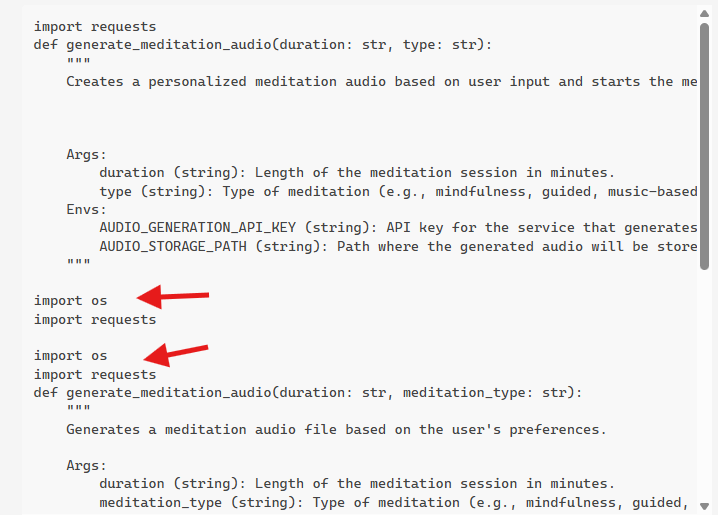
Tried to paste some code into the action code, but the editor doesn´t work properly. Doesn´t allow me to paste, sometimes it works, doesn´t allow me to delete, only certain parts. It even doesn´t allow me to delete text, that I´ve pasted before for example:

 import os
import requests

When I try to delete, the text line just jumps over the characters, but doesn´t delete them. I understand, that certain basic functions are as presets in the code, but please allow us to edit this code completely. Currently, this is not working.

2 Likes

I had the same issue. Very frustrating.

1 Like

@sitedude @charles_st_george That’s not a bug. The import components of the Python code are not editable in Pickaxe by design.

The idea is to allow non-technical users to use the 'Action Details’ section to hardcode the critical data into the code that you can partially edit under the ‘Action code’ section. Any of the 3 components marked with a red arrow in the screenshot below can be manually configured by you - whatever changes you make here will become hardcoded into the Action code.

You can add more libraries/packages to the code that will appear under

import os
import requests
  • by utilizing the ‘Additional Packages’ section.

Essentially anything above the red line is uneditable within the Action code section within the Pickaxe ecosystem.

Hi Ned,
thank you for your clarification, but I´m a non-coding user. I have used a pickaxe from someone else that helps with custom actions. So I copied this AI generated code (see below), and thought this would work. But no. It does not only not work, it also doesn´t allow me to delete the code, I´ve just entered. Only certain parts. After trying this several times in the window, I am stuck with this code that I can´t delete. The more often I paste my original code, the more code i won´t be able to delete:

import requests
def generate_meditation_audio(duration: str, type: str):
    """
    Creates a personalized meditation audio based on user input and starts the meditation with a modern interface.


    Args:
        duration (string): Length of the meditation session in minutes.
        type (string): Type of meditation (e.g., mindfulness, guided, music-based).
    Envs:
        AUDIO_GENERATION_API_KEY (string): API key for the service that generates meditation audio.
        AUDIO_STORAGE_PATH (string): Path where the generated audio will be stored or accessed.
    """

import os
import requests

import os
import requests
def generate_meditation_audio(duration: str, meditation_type: str):
    """
    Generates a meditation audio file based on the user's preferences.

    Args:
        duration (string): Length of the meditation session in minutes.
        meditation_type (string): Type of meditation (e.g., mindfulness, guided, music-based).

    Envs:
        Audio_Generation_API_Key (string): API key for the service that generates meditation audio.
        Audio_Storage_Path (string): Path where the generated audio will be stored or accessed.
    """

    api_key = os.getenv('Audio_Generation_API_Key')

    import os
import requests

def generate_meditation_audio(duration: str, meditation_type: str):
    """
    Generates a meditation audio file based on the user's preferences.

    Args:
        duration (string): Length of the meditation session in minutes.
        meditation_type (string): Type of meditation (e.g., mindfulness, guided, music-based).

    Envs:
        Audio_Generation_API_Key (string): API key for the service that generates meditation audio.
        Audio_Storage_Path (string): Path where the generated audio will be stored or accessed.
    """

    api_key = os.getenv('Audio_Generation_API_Key')

According to his bot, I should use the following setup for my custom action:

Yes, it’s possible to create a custom action for generating a meditation audio output based on user input. Here’s how you can set it up in Pickaxe:

Name

Generate Meditation Audio

Description

Creates a personalized meditation audio based on user input and starts the meditation with a modern interface.

Trigger Prompt

When a user indicates they want to start a meditation session, prompt them to specify their preferences (e.g., duration, type of meditation). Once received, generate a customized meditation audio and present it with a “Start Meditation” button in a modern design.

Function Inputs

  1. Name

    • Duration
    • Description: Length of the meditation session in minutes.
    • Example value: 10
  2. Name

    • Type
    • Description: Type of meditation (e.g., mindfulness, guided, music-based).
    • Example value: Mindfulness

Environment Variables

  1. Name

    • Audio Generation API Key
    • Description: API key for the service that generates meditation audio.
    • Value: YOUR_API_KEY_HERE
  2. Name

    • Audio Storage Path
    • Description: Path where the generated audio will be stored or accessed.
    • Value: /path/to/audio/storage/

Python Code for the Custom Function

import os
import requests

def generate_meditation_audio(duration: str, meditation_type: str):
    """
    Generates a meditation audio file based on the user's preferences.

    Args:
        duration (string): Length of the meditation session in minutes.
        meditation_type (string): Type of meditation (e.g., mindfulness, guided, music-based).

    Envs:
        Audio_Generation_API_Key (string): API key for the service that generates meditation audio.
        Audio_Storage_Path (string): Path where the generated audio will be stored or accessed.
    """

    api_key = os.getenv('Audio_Generation_API_Key')
    audio_storage_path = os.getenv('Audio_Storage_Path')

    # Make a request to the audio generation API
    response = requests.post(
        'https://api.meditationaudio.com/generate',
        json={
            'duration': duration,
            'type': meditation_type
        },
        headers={'Authorization': f'Bearer {api_key}'}
    )

    if response.status_code == 200:
        audio_data = response.content
        # Save the audio file
        audio_file_path = os.path.join(audio_storage_path, 'meditation_audio.mp3')
        with open(audio_file_path, 'wb') as audio_file:
            audio_file.write(audio_data)
        return audio_file_path
    else:
        raise Exception("Failed to generate meditation audio. Please check your inputs and API key.")

# Instructions for Custom Bot Creation
# 1. Define the trigger prompt to capture user inputs for duration and meditation type.
# 2. Set up the required environment variables with your API key and desired storage path.
# 3. Implement the function using the provided Python code, and ensure you handle any exceptions.
# 4. Design the UI with a modern button labeled "Start Meditation" that triggers the function.

There are several major issues with the code you shared.

1st, I see you’re trying to create the audio streaming meditation thing here. It’s not likely to work if you implement it this way since Pickaxe does not yet support audio streaming. That can be a popular Feature request! You have my vote if you post it.

There is a potential workaround for audio streaming with a script that you can attach to your studio. I might be able to help you with that. Send me a DM if you’re interested.

2nd, you’re pasting the import os and import requests too many times.

Here is an example of Python action-code that you can give to your favorite AI tool to use as a template:

Mind the spacing. If you get these wrong, it will cause a syntax error, and your code will not work properly.

Anything under the red line can be deleted or edited (anything within the yellow square). Anything above (or out of the yellow square) cannot - you’ll have to configure it in the ‘Action details’ section.

My code (for a basic make webhook):

import os
import requests
import logging

def linkedin_optimization_make_webhook(linkedin_url: str):
    """
    Sends a basic request with data payloads to a make.com webhook

    Args:
        linkedin_url (string): The URL of the user’s LinkedIn profile to be analyzed and scored.
    Envs:
        MAKE_COM_WEBHOOK (string): Webhook link from Make.com
    """

    
    make_url = os.getenv("MAKE_COM_WEBHOOK")
    if not make_url:
        error_msg = "MAKE_COM_WEBHOOK environment variable is not set."
        logging.error(error_msg)
        return {"error": error_msg}

    data_to_send = {
        "linkedin_url": linkedin_url
    }

    try:
        response = requests.post(make_url, json=data_to_send, timeout=60)
        response.raise_for_status()

        # Try to parse the JSON response from Make
        try:
            result = response.json()
            return result  # Return the full data for Pickaxe/code interpreter
        except ValueError:
            # Not a JSON response, just text
            logging.warning("Received non-JSON response from Make.")
            return {"error": "Make returned non-JSON response.", "response": response.text}

    except requests.exceptions.RequestException as req_err:
        logging.error(f"Request error sending data to Make: {req_err}")
        return {"error": f"Failed to send data to Make. Error: {req_err}"}

    except Exception as e:
        logging.error(f"Unexpected error: {e}")
        return {"error": f"An unexpected error occurred: {e}"}```

Hi Ned,
yes, I pasted the import os and import requests too many times to display the problem of this editor. I pasted and then wasn´t able to delete it again. It just stays there and can´t be deleted. So I try to paste code, and then I´m not able to get rid of it and to erase the error.

Do you understand? I hope I could make myself clear now.

2 Likes

Yes @sitedude I understand you. I used to run into these issues when I first started with Pickaxe. I recall I used to just delete the action and redo it from scratch. Always worked

sure, that´s a workaround, but annoying as hell. Can we tag someone from the admin team, so they can fix this issue? @admin_mike would that be you?

Has there been any update or work around on this. I am pasting code that contains a properly formatted functionand the cirrect imports. I do nto have any variable defined in the action details tab, instead I am using the function i provided. (1) Does this make a difference?

My code is below:

import requests
import os

API_URL = os.environ.get(
“API_URL”,
https://api.airia.ai/v2/PipelineExecution/GUID”,
)
AIRIA_API_KEY = os.environ[“AIRIA_API_KEY”] # make sure this is set in your env

def airia_slide_generator(slides: str, description: str, tone: str):
“”"
Generate Gamma slides through the Airia pipeline.

Args:
    slides (str): Number of slides in the presentation.
    description (str): Description of the presentation.
    tone (str): Tone and audience for the slides.
"""

# Build the equivalent of the curl --data JSON body
payload = {
    "userInput": (
        f"Create a {slides}-slide presentation.\n\n"
        f"Description: {description}\n"
        f"Tone & audience: {tone}"
    ),
    "asyncOutput": False,
}

headers = {
    "X-API-KEY": AIRIA_API_KEY,
    "Content-Type": "application/json",
}

response = requests.post(API_URL, headers=headers, json=payload)

# Raise if any HTTP error
response.raise_for_status()

# For now, just print and return the JSON response
data = response.json()
print(data)
return data

def airia_slide_generator():
“”"
Email to presentation

"""

# Insert your PYTHON code below. You can access environment variables using os.environ[].
# Currently, only the requests library is supported, but more libraries will be available soon.
# Use print statements or return values to display results to the user.
# If you save a png, pdf, csv, jpg, webp, gif, or html file in the root directory, it will be automatically displayed to the user.
# You do not have to call this function as the bot will automatically call and fill in the parameters.

Hi @michaeltbrown ,
Thank you for reaching out!

Based on your code and description, it seems your current setup may not align with how Actions work on our platform.

In Pickaxe, the function name, description, parameters, environment variables, and additional packages must all be defined in the Action Details tab.

The Action Code tab is only for writing a single Python function, and the function name, description, and inputs shown there are fixed because they can only be set or changed in the Action Details tab.

Imports only work if you have added those packages in the Action Details tab under additional packages.

Defining parameters inside your Python code does not register them with Pickaxe, so the system will not know what values to pass in. Your current code also contains two functions with the same name, which will not work in Pickaxe because the Action Code page only supports one function. Once you define the function name and parameters correctly in the Action Details tab and then write only that one function in the Action Code tab, things should work as expected.

Here are some resources that might be helpful:

Thank you for your assistance. However this does not solve my main issue…. which is I am not able to add in the code into the other function, because I am not able to edit the text area. How can I edit the text area?

I am a non-code person and created some custom actions by vibe coding using Claude. So I ran into this same situation. If you add the imports on the setup page and then only paste the code without the imports included, that worked for me. What the admin is saying is that in pickaxe you have to add the imports on that setup page and you’ll notice that pickaxe prefills some of the python code for you. You just have to figure out at what point you should start copying your other code.

Another observation or suggestion is that whenever you have a problem, the admins seem to figure it out a lot quicker if you shoot a loom video showing what’s happening.

Welcome to the community and I hope you get this figured out.

2 Likes